Your AV system is only as reliable and secure as the network it relies on
Modern workplace technology is no longer a collection of standalone devices. Meeting rooms, video conferencing systems, digital signage, wireless presentation, room booking, IP-based audio and video, and connected building technologies increasingly depend on IP networks and cloud platforms.
As workplace technology becomes more connected, the network is no longer simply supporting the AV system. It has become an integral part of the AV infrastructure, affecting performance, security, reliability and how effectively technology can be managed.
A meeting room that takes too long to connect, a digital signage display that repeatedly drops offline or a video call affected by latency can quickly undermine the user experience. In many cases, the problem isn't the audio visual equipment itself; it can be the network infrastructure behind it.
Why is network infrastructure important for AV systems?
Modern AV systems rely on networks to communicate between devices, access cloud services and deliver real-time audio and video.
A typical workplace environment might have network-connected:
- Video conferencing systems
- Displays and digital signage
- Wireless presentation systems
- Networked microphones and speakers
- Room booking systems
- Touchscreen room controllers
- IP-based audio and video distribution
- Cloud-based content management platforms
- Remote monitoring and management systems
- Connected building and workplace technologies
Each device adds another connection to the network. As the number of connected devices increases, so does the importance of having sufficient bandwidth, reliable connectivity, low latency and appropriate security controls.
A well-designed network helps ensure that audio visual and IT technologies start quickly, communicate reliably and deliver a consistent experience for users. The network isn't simply carrying the AV traffic. It is part of the AV solution.
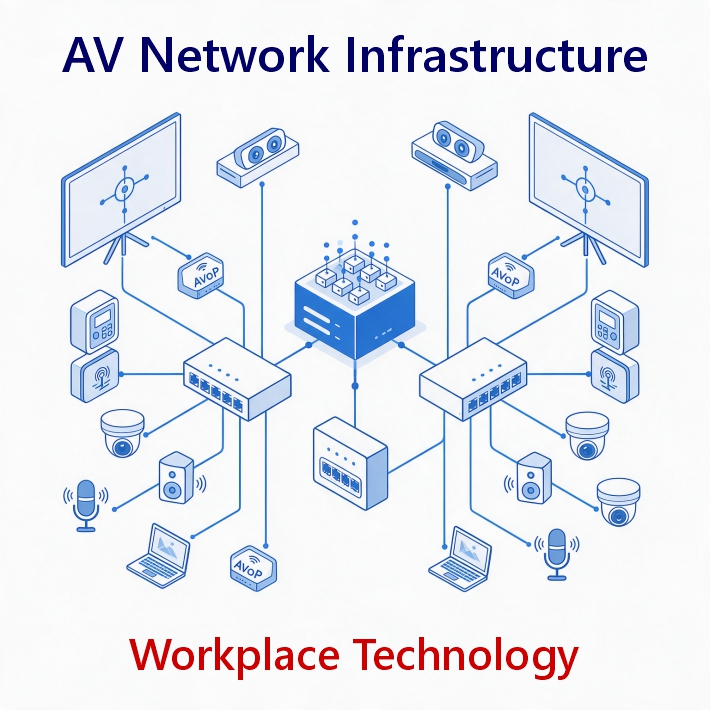
Why AV systems should use a dedicated network and network switches?
For many commercial and enterprise environments, audio visual systems should operate on a dedicated or logically separated network (and switches) rather than sharing the same network as general business devices.
Modern AV systems are increasingly IP-based, with audio, video, control data, device management and cloud services all communicating across the network. Meeting room cameras, microphones, displays, control processors, wireless presentation systems and digital signage can generate significant network traffic and require reliable, predictable connectivity.
A dedicated AV network, AV VLANS and the correct network switches create a stable base for all the audio visual solutions. It is important to have appropriately configured network switches and VLANs connected to the network.
Here’s why:
- Improved performance: AV traffic can be managed independently, helping reduce the potential impact of other network activity on latency-sensitive audio and video.
- Greater security: Separating AV devices from general corporate systems can reduce unnecessary network access and help limit the potential impact of a compromised device.
- Better network management: IT teams can establish specific policies for AV traffic, device access, bandwidth and communication between systems.
- Simplified troubleshooting: Keeping AV devices within a defined network environment makes it easier to identify connectivity and performance issues.
- Scalability: A structured AV network makes it easier to add meeting rooms, digital signage and other IP-based workplace technologies as requirements grow.
- Centralised monitoring: Networked AV equipment can be monitored and managed more effectively when devices are logically grouped and consistently configured.
This doesn't necessarily mean that every organisation needs a separate physical network for AV. A dedicated VLAN or other form of logical network segmentation can often provide the required separation while allowing authorised communication with corporate, cloud and collaboration services.
The correct network architecture should therefore be determined as part of the AV and IT design, taking into account the organisation's security policies, existing infrastructure, AV requirements and future plans.
The objective is not simply to separate AV from the corporate network. It is to create a controlled network environment in which AV technology can operate securely, reliably and predictably.
What is a VLAN and why is it important?
A VLAN, or Virtual Local Area Network, allows devices to be logically separated within a wider physical network.
An AV VLAN can be used to group and isolate connected AV equipment, helping IT teams control network traffic and manage how those devices communicate with other systems. For example, an organisation may use network segmentation to separate meeting room AV equipment from general corporate devices while still allowing authorised communication with Microsoft Teams, cloud services or central management platforms.
VLANs can therefore contribute to both network management and security. However, VLAN configuration should form part of the wider network architecture rather than being treated as a standalone security measure. Firewall rules, authentication, access controls and device security remain important components of a secure AV environment.
How do VLANS affect AV system security?
For higher-demand AV environments, VLAN design can have a direct impact on equipment reliability.
Incorrect switch or VLAN configuration can result in unreliable AV equipment, particularly where systems are handling high-demand data such as real-time audio such as Dante audio, and 4K or high-quality video. Poorly configured networks can contribute to latency, packet loss, connectivity interruptions and devices repeatedly dropping offline.
The network architecture may also need to separate different types of AV traffic. Depending on the system and its requirements, separate VLANs may be used for audio, video and management traffic. This can help control how different types of data move across the network and make it easier to apply appropriate policies and troubleshoot problems.
For larger deployments, multiple VLANs may be required to support multiple meeting rooms or areas of an organisation. This needs to be planned alongside the wider switching, routing, addressing and security architecture rather than added retrospectively.
VLANs can therefore contribute to both network management and security, but they also form an important part of reliable AV system design.
VLAN configuration should form part of the wider network architecture rather than being treated as a standalone security measure. Firewall rules, authentication, access controls, traffic management and device security remain important components of a secure and reliable AV environment.
How does PoE affect AV equipment reliability?
Power is another important consideration when designing a network for connected AV technology.
Many workplace AV and building technology devices are PoE (Power over Ethernet) powered, meaning that the network cable provides both data connectivity and electrical power to the device. This can simplify installation by reducing the need for separate power supplies and cabling. However, PoE also means that the network infrastructure is directly responsible for keeping those devices powered.
Every PoE switch has a defined power budget. If the connected devices require more power than the switch can provide, equipment may not operate correctly or may become unreliable. This can be particularly important in environments with multiple cameras, wireless access points, touch panels, room controllers, speakers and other PoE-powered devices.
The switch therefore needs to be selected based on both network capacity and available PoE power.
Cabling is also important. High-quality structured cabling, such as Cat6A, can provide the appropriate infrastructure for higher-performance networks and the power requirements of modern PoE deployments when installed to the relevant standards.
PoE should therefore be considered as part of the overall AV network design, including:
- PoE power requirements
- Switch power budgets
- Number of powered devices
- Network bandwidth
- Cable type and quality
- Cable length and installation
- Switch capacity
- Resilience and UPS protection
Getting the power infrastructure wrong can result in devices that appear to have a network or hardware fault when the underlying problem is insufficient or unstable PoE power.
What are the main security risks associated with connected AV equipment?
Every network-connected device represents another endpoint that needs to be managed and protected. AV equipment can include operating systems, firmware, applications, web interfaces, APIs and remote management functionality. If these are not properly secured and maintained, they can potentially introduce vulnerabilities into the wider technology environment.
This doesn't mean that connected AV equipment is inherently insecure. It means that AV security needs to be considered as part of the organisation's wider cybersecurity strategy.
Common areas that need consideration include:
- Outdated firmware and software
- Unsupported devices
- Weak or default credentials
- Unauthorised access
- Insecure remote connections
- Poorly controlled user permissions
- Unnecessary network access
- Lack of device visibility
- Unmonitored endpoints
Network segmentation, device authentication, secure remote access, endpoint protection, patch management and continuous monitoring can all contribute to a more controlled environment.
Do network conditions affect video conferencing quality?
Security and performance are closely connected. Video conferencing is particularly sensitive to network conditions because it involves the real-time transmission of audio and video. A properly designed network should consider the requirements of real-time collaboration. This can include:
- Sufficient network capacity
- Reliable wired and wireless connectivity
- Appropriate traffic management
- Low latency
- Network resilience
- Appropriate VLAN segmentation
- Monitoring and visibility
Additional security is also a consideration where AV systems should be secured by antivirus or EDR. The result is a meeting room that is not only secure but also provides the reliable experience users expect.
How can you prevent meeting room AV systems from going offline?
There is no single measure that guarantees an AV system will never experience an outage. However, combining good infrastructure design with proactive monitoring and maintenance can significantly improve reliability.
The process starts with understanding the network requirements of the AV system before installation. This means considering:
- Network capacity
- Connectivity
- Switch configuration
- VLAN architecture
- PoE requirements and power budgets
- Cabling
- Power and resilience
- Device addressing
- Security requirements
- Remote access
- Firmware and software management
- Future expansion
Once installed, ongoing monitoring can help identify potential problems such as devices going offline, connectivity issues, outdated firmware, abnormal system behaviour or recurring network-related faults.
The objective is to identify and resolve issues before they become a meeting-room problem. Real-time health reports provide valuable insights to identify and address issues before they become problems.
Can AV network security be managed across multiple meeting rooms?
Yes. It is important to follow the same network setup across the audio visual estate in all office locations. Centralised monitoring and management can provide visibility across multiple rooms, buildings and locations. For organisations with large numbers of meeting rooms, manually checking each system is inefficient and makes it difficult to maintain consistent standards.
A centralised platform such as AV Intellicore can provide a consolidated view of connected workplace technology, helping teams:
- Monitor device health
- Identify offline equipment
- Track system status
- Manage firmware and patch updates
- Investigate problems remotely
- Identify recurring issues
- Maintain greater visibility across multiple locations
This becomes increasingly important as organisations deploy standardised meeting room technology across offices, regions or global estates.
Why should network infrastructure be considered during AV design?
Network requirements should be considered before the AV equipment is installed, not after. A successful workplace technology deployment starts by understanding how the technology will communicate, how it will be powered, how it will be managed and what the organisation expects it to deliver.
Network infrastructure should therefore be considered alongside:
AV design → IT infrastructure → Network architecture → Cybersecurity → Device management → Monitoring → Ongoing support
This approach helps avoid issues caused by insufficient network capacity, inappropriate connectivity, incorrect VLAN or switch configuration, insufficient PoE power, poor cabling or limited device visibility. It also makes it easier to accommodate future workplace technology as requirements evolve.
What are the benefits of a secure AV network infrastructure?
A properly designed and managed network provides several important benefits.
Reliable AV performance
Stable connectivity, sufficient bandwidth, appropriate VLAN configuration, adequate PoE power and low latency help deliver consistent video conferencing, streaming and device communication.
Enhanced cybersecurity
Network segmentation, authentication, access controls, secure remote access and endpoint protection can help reduce the risk associated with connected AV equipment.
Greater visibility
Centralised monitoring provides IT and AV teams with greater insight into device health, connectivity and potential problems.
Easier management
Remote diagnostics, updates and maintenance can reduce the need for unnecessary site visits and make it easier to manage multiple rooms and locations.
Scalability
A structured network infrastructure provides a foundation for adding new meeting rooms, collaboration technology, digital signage and connected workplace systems as requirements evolve.
Improved user experience
Reliable technology means users can enter a meeting room, connect to a call, share content and collaborate without having to think about the infrastructure operating behind it.
How to maintain the performance of of your network and technology
The modern workplace depends on technology that is connected, available and secure. A secure network provides the foundation, but maintaining the performance and security of connected AV systems requires ongoing visibility, management and proactive support. This is where AV Intellicore extends the value of an AV installation beyond the initial deployment. By continuously monitoring connected AV and workplace technology, providing remote diagnostics, managing updates and supporting endpoint protection, AV Intellicore helps organisations maintain a more secure, reliable and controlled technology environment. The goal isn't simply to install AV technology that works today. It's to create a workplace technology environment that remains secure, reliable and manageable throughout its operational life. At Display Manager, we take pride in designing and building secure network infrastructure as an integral part of our approach to AV integration. By combining AV expertise with network-aware design, installation and ongoing managed services, we help organisations create workplace technology environments that are secure, scalable, reliable and built for the future.